Real World XOR (Cloudflare Email Protection)
After discussing XOR obfuscation in a previous post, we examine a real-world use in Cloudflare’s Email Address Obfuscation service. This is used to stop simple (albeit lazy) bots from finding emails on a webpage. This blogpost will be a short one, as the concept is really simple but I thought it was a nice demonstration of XOR in the wild.
I first came across this when on a CTF, I found an email hyperlink that looked something like this:
1
<a href="/cdn-cgi/l/email-protection#325b544657595a5340414b57567242405d465d5c1c5f570d414750585751460f505d5d5912414755555741465b5d5c">Email Me!</a>
This interested me and I decided to investigate into what it was. After digging, I found that it was Cloudflare’s email protection system. This is generated to hide emails from bots.
Rather than exposing an email address as (for instance):
1
mailto:randomemail@proton.me
Cloudflare obfuscates (through XOR!) the email address into the long hex string present after # in /cdn-cgi/l/email-protection#325b544.... This XORed string is then decoded in-browser via javascript, therefore scrapers/bots that don’t use JS are prevented from harvesting it.
How it’s encoded
Let our demonstration email hyperlink be:
1
325b544657595a5340414b57567242405d465d5c1c5f570d414750585751460f505d5d5912414755555741465b5d5c
(as shown above)
To decode XOR, we need a key. The key for this cipher is in the first byte (the first two hex characters) and is randomly generated. Due to how the key is stored alongside the ciphertext, the scheme provides no secrecy and basically only transfomation. As shown, the first byte is 0x32, which is equivalent to 0b110010 or decimal 50: our key.
The rest of the message can now be decoded by splitting the message into hex pairs / bytes (i.e., 5b 54 46 57 59 5a...).
Now, we can XOR each byte with the key (so):
1
0x32 ^ ENCODED_BYTE = PLAIN_BYTE
For instance, 5b:
1
2
3
4
0x32 = 0b00110010
0x5b = 0b01011011

res  = 0b01101001 = 0d105 = ASCII 'i' (first character of the email!)
Let’s make this quicker:
Automating using Python
Decode
Let’s automate the decode process:
1
2
3
4
5
6
7
8
9
10
11
12
encoded = "325b544657595a5340414b57567242405d465d5c1c5f570d414750585751460f505d5d5912414755555741465b5d5c"

key = int(encoded[:2], 16)
data = encoded[2:]

decoded = ""

for i in range(0, len(data), 2):
    byte = int(data[i:i+2], 16)
    decoded += chr(byte ^ key)

print(decoded)
It’s really that simple! 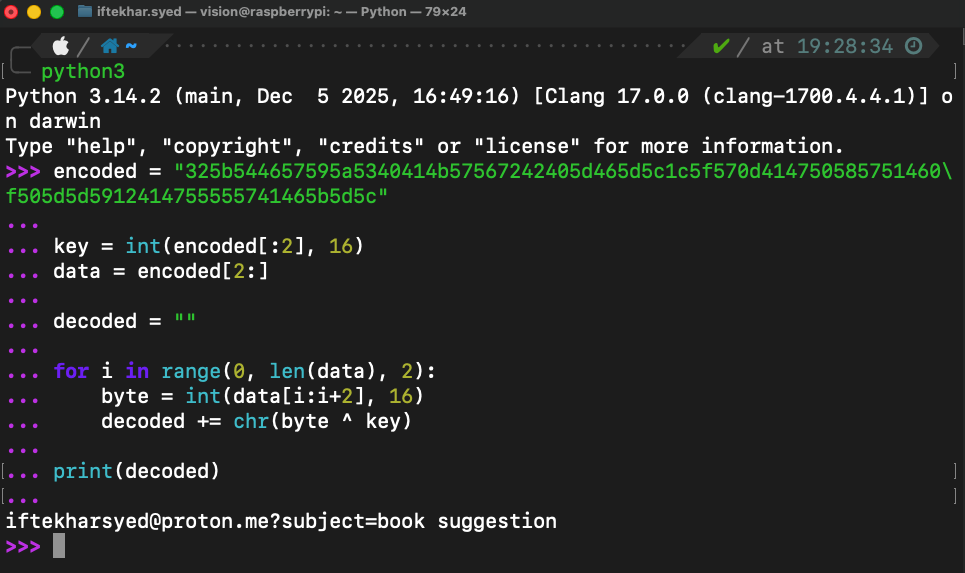
Encoding
For completeness, we can also reproduce the process of encoding:
1
2
3
4
5
6
7
8
9
10
11
12
13
14
15
16
17
18
import random

def cloudflare_encode(email_string):
    key = random.randint(0, 255) #make random xor key
    encoded_bytes = [key]

    for char in email_string:
        encoded_bytes.append(ord(char) ^ key)

    hex_string = "".join(f"{b:02x}" for b in encoded_bytes) # converting to hex

    return f"/cdn-cgi/l/email-protection#{hex_string}" # returing full str


if __name__ == "__main__":
    email = "example@website.com"
    encoded = cloudflare_encode(email)
    print(encoded)
Analysis
This is a light and simple encoder. Whilst it stops basic scrapers, it fails against bots that can access JS, anyone inspecting DOM, reading source…, so in summary it’s purely a client-side obfuscation layer creating friction for scrapers.
This is a textbook example of the difference between security and obfuscation, and was a nice example of XOR in the wild that I thought would be nice to go into :)